You probably know nmon for Linux and AIX if you come
to this page... It is a very simple and nice system monitoring and
reporting tool developed by IBM engineer Nigel Griffiths. Recently
(July 2009) nmon Linux has been released to the OpenSource community.
NMON has for its reporting aspect many tools to represent the
captured data. The main one is "nmon analyzer", to be downloaded from http://www.ibm.com/developerworks/aix/library/au-nmon_analyser/.
This Excel macro loads a raw nmon file and generates graphs.
I find Excel a perfect tool to manipulate the captured data and
render as wish.
For large systems, with number of disk devices greater than 254, nmon
analyzer has been edited to a XXL purpose, for Excel 2007 of
higher. See bellow for more information.
For more information on this tool and its creator Nigel:
Working sometimes on Solaris, I could not find its equivalent for
reporting purpose, especially the ability to setup the tool easily, and
to get numerous OS raw measurements and graphs on Excel (as opposed to
PDF or custom graphing tool).
So I decided to write such a tool, and I found the easiest way was to start from SAR tool (http://docs.sun.com/app/docs/doc/816-5165/sar-1?a=view) and to add few hooks in order to render system activity in NMON file format.
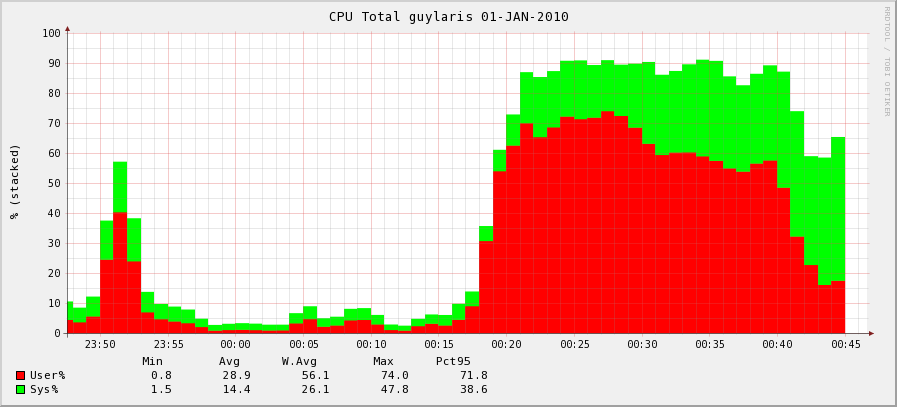
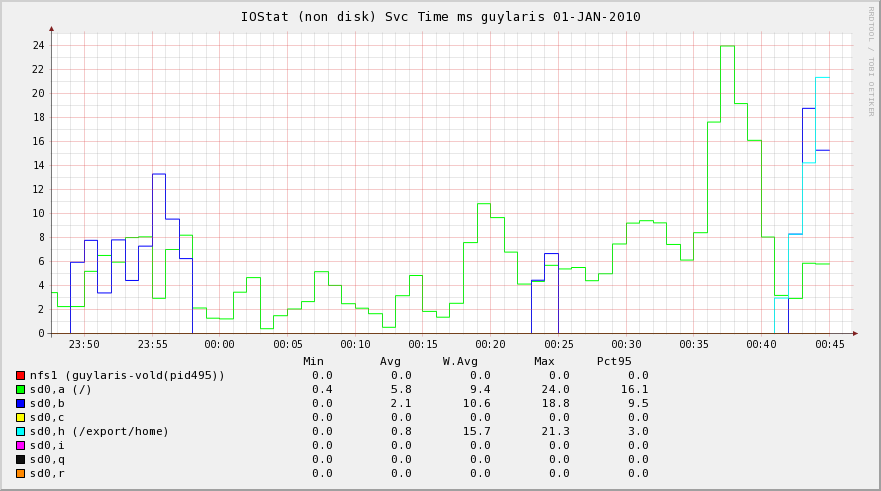
Sarmon also supports fully RRD output.
 |
 |
 |
| CPU |
IOStat Service Time |
Processes Wait Times |
No warranty given or implied when using sarmon.
Table of Content
Architecture
Sarmon supports Solaris 10 and 11. Solaris 10 early versions require sarmon early release ('es' version).
Sadc, the sar daemon which captures OS activity, has been modified to
output also the nmon file. If sadc generates a file called for example sa17, then another file called sa17.hostname_yymmdd_hhmm.nmon is generated too.
sadc output native file format is not changed.
All sarmon code has been placed into two separate files (sarmon.c and
sarmon.h) with most of its methods and variables being static. Any hook
method placed in sadc.c will have its name prefixed by sarmon_ to avoid
any confusion. There are currently 5 hooks (init, snap, close, sleep
and one to capture usage per CPU) in sadc.c.
Additionally prstat project code has been used with out any change to
log statistics per process and for accounting per zone or project. At
the end of prstat.c, some code has been added to output statistics in
nmon format.
Also iostat partial code has been used too in order to render mount points and NFS name to the raw block device name.
"Linux" OS is recognized by the analyzer via the "AAA,Linux" line inside the nmon file.
Project Ground Rules
The project will follow the following rules for its design and implementation:
- Minimum change in original SAR project code. Only few hooks shall
be added to process nmon features outside original code. One key reason
is that any change of sar project can be merged in minutes
- sarmon is an extension to sar, so any command parameter, feature and output shall remain unchanged
- sadc output raw file format shall not be changed. This means any
data structure required for extending sar (i.e. monitor each CPU) shall
be carried within sarmon code, and shall not be placed in raw sadc files
- sarmon can provide more monitoring feature, output shall be part of nmon report
- sarmon nmon reporting shall be compatible with nmon file format
(well, not formally document thought!), so that tools such as "nmon
analyzer" can process the file. Currently it has been tested with
version 33D, 33e, 33f and 43a
- sarmon does not need to run as root
Source Code
Original SAR source code has been downloaded from OpenSolaris, under
"Common Development and Distribution License" license. Base code version
is build 130 (realligned on build 146 today). Original source code
locations can be found at:
SourceForge project at http://sourceforge.net/projects/sarmon/
As few parts are reuse of OpenSolaris, the code uses few private
APIs. Over time, I will do my best to remove them over time. Namely as
for v1.12: zone_get_id, getvmusage, di_dim_fini, di_dim_path_dev,
di_dim_path_devices, di_lookup_node.
Download SARMON
| Source Code |
Download from SourceForge |
| Binaries (i386 and SPARC) |
| Sample Excel Output |
| Sample RRD Output |
| nmon analyzer XXL |
Fields
| Worksheet |
Column |
Description |
CPU_ALL
CPUnnn |
User%
Sys%
Wait%
Idle% |
Average CPU time %:
- user time
- system time
- wait time (= 0 on Solaris 10)
- Idle = 100 - User% - Sys% - Wait%
See note on release 1.11
|
| CPU% |
User% + Sys% |
| CPUs |
Number of CPUs |
| CPU_SUMM |
User%
Sys%
Wait%
Idle% |
Breakdown of CPU Utilisation by logical processor over the collection period |
| MEM |
memtotal |
(in MB) total usable physical memory |
| swaptotal |
= swapfree + swapused |
| memfree |
(in MB) free physical memory. For Solaris file system cache (FSCache) is located inside this area.
Same as 'vmstat.memory.free' value in MB |
| swapfree |
(in MB) Free swap space
Same as 'swap -s.available'
Same as 'sar -r.freeswap / 2' (/2 since unit is block size)
Close to 'vmstat.memory.swap' value in MB (which does not include reserved space) |
| swapused |
(in MB) used swap (reserved + allocated)
Same as 'swap -s.allocated' |
| MEMNEW |
Not Used |
- |
| MEMUSE |
%rcache
%wcache |
Cache hit ratio
Same as 'sar -b' |
lread
lwrite |
(/s) accesses of system buffers
Same as 'sar -b' |
pread
pwrite |
(/s) transfers using raw (physical) device mechanism
Same as 'sar -b' |
| %comp |
Ignore (negative value) |
bread
bwrite |
(/s) transfer of data between system buffers and disk or other block device
Same as 'sar -b' |
| VM |
minfaults |
(pages/s) minor faults (hat and as minor faults)
Same as 'vmstat.mf' |
| majfaults |
(pages/s) major faults |
pgin
pgout |
(pages/s) pageins and outs |
| scans |
(pages/s) pages examined by pageout daemon
Same as 'vmstat.sr' |
| reclaims |
(pages/s) pages freed by daemon or auto
Same as 'vmstat.re' |
pgpgin
pgpgout |
(KB/s) pages paged in and out
Same as 'vmstat.pi and po' |
pswpin
pswpout |
(KB/s) pages swapped in and out
Same as 'vmstat.si and so' |
| pgfree |
(KB/s) pages freed by daemon or auto
Same as 'vmstat.fr' |
DISKREAD
IOSTATREAD
CTRLREAD
VxVMREAD |
device name
device name
ctrler name
vol name |
(KB/s) read from block device (disk, other [nfs, partition, iopath, tape], controller, VxVM volume)
Same as 'iostat -x.kr/s'. For iostat, a disk is referred as a device. Controller stats: -C option |
DISKWRITE
IOSTATWRITE
CTRLWRITE
VxVMWRITE |
device name
device name
ctrler name
vol name |
(KB/s) written to block device (disk, other [nfs, partition, iopath, tape], controller, VxVM volume)
Same as 'iostat -x.kw/s'. For iostat, a disk is referred as a device. Controller stats: -C option |
DISKXFER
IOSTATXFER
CTRLXFER
VxVMXFER |
device name
device name
ctrler name
vol name |
(ops/s) read + write (disk, other [nfs, partition, iopath, tape], controller, VxVM volume)
Same as 'iostat -x.r/s+w/s'. For iostat, a disk is referred as a device. Controller stats: -C option
Same as 'sar -d.r+w/s' |
DISKBSIZE
IOSTATBSIZE
CTRLBSIZE
VxVMBSIZE |
device name
device name
ctrler name
vol name |
(KB/xfer) Average data size per block device transfer (disk, other [nfs, partition, iopath, tape], controller, VxVM volume)
Same as 'iostat -x.(kr/s+kw/s)/(r/s+w/s)'. For iostat, a disk is referred as a device. Controller stats: -C option |
DISKBUSY
IOSTATBUSY
CTRLBUSY
VxVMBUSY |
device name
device name
ctrler name
vol name |
(%) Percent of time the block device is busy (transactions in
progress) (disk, other [nfs, partition, iopath, tape], controller,
VxVM volume)
Same as 'iostat -x.%b'. For iostat, a disk is referred as a device. Controller stats: -C option
Same as 'sar -d.%busy'
Warning: for controller and VxVM volume, it is an estimation
|
DISKSVCTM
IOSTATSVCTM
CTRLSVCTM
VxVMSVCTM |
device name
device name
ctrler name
vol name |
(ms) Average service time (disk, other [nfs, partition, iopath, tape], controller, VxVM volume)
Same as 'sar -d.avserv'
Same as 'iostat -xn.asvc_t'. For iostat, a disk is referred as a device. Controller stats: -C option |
DISKWAITTM
IOSTATWAITTM
CTRLWAITTM
VxVMWAITTM |
device name
device name
ctrler name
vol name |
(ms) Average wait time (disk, other [nfs, partition, iopath, tape], controller, VxVM volume)
Same as 'sar -d.avwait'
Same as 'iostat -xn.wsvc_t'. For iostat, a disk is referred as a device. Controller stats: -C option |
| DISK_SUM |
Disk Read KB/sec |
(KB/s) Total of all disk reads |
| Disk Write KB/sec |
(KB/s) Total of all disk writes |
| IO/sec |
(ops/s) Total of all disk transfers |
| NET |
if-read |
(KB/s) KB read on this interface |
| if-write |
(KB/s) KB written to this interface |
| if-total |
(KB/s) KB read + written for this interface |
| total-read |
(KB/s) KB read for all interfaces |
| total-write |
(KB/s) KB written for all interfaces |
| NETPACKET |
if-reads/s |
(packets/s) packets read on this interface |
| if-writes/s |
(packets/s) packets written to this interface |
| NETERROR |
if-ierrs |
(packets/s) incoming packets with error |
| if-oerrs |
(packets/s) outgoing packets with error |
| if-collisions |
(col/s) collisions per second |
| FILE |
iget |
(/s) translations of i-node numbers to pointers to the i-node
structure of a file or device. Calls to iget occur when a call to to
namei has failed to find a pointer in the i-node cache. This figure
should therefore be as close to 0 as possible
Same as 'sar -a.iget/s' |
| namei |
(/s) calls to the directory search routine that finds the address of a v-node given a path name
Same as 'sar -a.lookuppn/s' |
| dirblk |
(/s) number of 512-byte blocks read by the directory search routine to locate a directory entry for a specific file
Same as 'sar.-a.dirblk/s' |
| readch |
(bytes/s) characters transferred by read system call
Same as 'sar -c.rchar/s' |
| writech |
(bytes/s) characters transferred by write system call
Same as 'sar -c.wchar/s' |
| ttyrawch |
(bytes/s) tty input queue characters
Same as 'sar -y.rawch/s' |
| ttycanch |
(bytes/s) tty canonical input queue characters
Same as 'sar -y.canch/s' |
| ttyoutch |
(bytes/s) tty output queue characters
Same as 'sar -y.outch/s' |
| PROC |
RunQueue |
the average number of kernel threads in the run queue. This is
reported as RunQueue on the nmon Kernel Internal Statistics
panel. A value that exceeds 3x the number of CPUs may
indicate CPU constraint
Same as 'sar -q.runq-sz'
Same as 'vmstat kthr.r' |
| Swap-in |
the average number of kernel threads waiting to be paged in
Same as 'sar -q.swpq-sz'
Same as 'vmstat kthr.w' |
| pswitch |
(/s) the number of context switches
Same as 'sar -w.pswch/s' |
| syscall |
(/s) the total number of system calls
Same as 'sar -c.scall/s' |
| read |
(/s) the number of read system calls
Same as 'sar -c.sread/s' |
| write |
(/s) the number of write system calls
Same as 'sar -c.swrit/s' |
| fork |
(/s) the number of fork system calls
Same as 'sar -c.fork/s' |
| exec |
(/s) the number of exec system calls
Same as 'sar -c.exec/s' |
| sem |
(/s) the number of IPC semaphore primitives (creating, using and destroying)
Same as 'sar -m.sema/s' |
| msg |
(/s) the number of IPC message primitives (sending and receiving)
Same as 'sar -m.msg/s' |
| %RunOcc |
(%) The percentage of time that the dispatch queues are occupied
Same as 'sar -q.%runocc' |
| %SwpOcc |
(%) The percentage of time LWPs are swapped out
Same as 'sar -q.%swpocc' |
| kthrR |
the number of kernel threads in run queue
Same as 'vmstat.kthr r' |
| kthrB |
the number of blocked kernel threads that are waiting for resources I/O, paging, and so forth
Same as 'vmstat.kthr b' |
| kthrW |
the number of swapped out lightweight processes (LWPs) that are waiting for processing resources to finish
Same as 'vmstat.kthr w' |
| PROCSOL |
USR |
(%) The percentage of time all processes have spent in user mode (estimation since terminated processes are not accounted) |
| SYS |
(%) The percentage of time all processes have spent in system mode (estimation since terminated processes are not accounted) |
| TRP |
(%) The percentage of time all processes have spent in processing
system traps (estimation since terminated processes are not
accounted) |
| TFL |
(%) The percentage of time all processes have spent processing
text page faults (estimation since terminated processes are not
accounted) |
| DFL |
(%) The percentage of time all processes have spent processing
data page faults (estimation since terminated processes are not
accounted) |
| LAT |
(%) The percentage of time all processes have spent waiting for CPU (estimation since terminated processes are not accounted) |
WLMPROJECTCPU
WLMZONECPU
WLMTASKCPU
WLMUSERCPU |
project name
zone name
task id
username |
CPU% for this project or zone or task or user. This value is
approximative since processes that terminated during the previous laps
can not be accounted
Same as 'prstat -J.CPU' (or -Z or -T or -a)
Shows maximum 5 entries by default. It can be adjusted via NMONWLMMAXENTRIES environment variable (see bellow) |
WLMPROJECTMEM
WLMZONEMEM
WLMTASKMEM
WLMUSERMEM |
project name
zone name
task id
username |
MEM% for this project or zone or task or user. Same as 'prstat
-J.MEMORY' (or -Z or -T or -a) when running 64-bit sarmon version on a
64-bit kernel (or a 32-bit sarmon version on a 32-bit kernel). If not
matching, it is the sum of the memory of all processes
Shows maximum 5 entries by default. It can be adjusted via NMONWLMMAXENTRIES environment variable (see bellow) |
| TOP |
PID |
process id. Only processes with %CPU >= .1% are listed |
| %CPU |
(%) average amount of CPU used by this process
Same as 'prstat.CPU' |
| %Usr |
(%) average amount of user-mode CPU used by this process
Equal to 'prstat.CPU * prstat -v.USR / (prstat -v.USR + prstat -v.SYS)' |
| %Sys |
(%) average amount of kernel-mode CPU used by this process
Equal to 'prstat.CPU * prstat -v.SYS / (prstat -v.USR + prstat -v.SYS)' |
| Threads |
Number of LWPs of this process
Same as 'prstat.NLWP' |
| Size |
(KB) total virtual memory size of this process
Same as 'prstat.SIZE' |
| ResSize |
(KB) Resident set size of the process
Same as 'prstat.RSS' |
| ResData |
=0 |
| CharIO |
(bytes/s) count of bytes/sec being passed via the read and write system calls |
| %RAM |
(%) = 100 * ResSize / total physical memory |
| Paging |
(/s) sum of all page faults for this process |
| Command |
Name of the process
Same as 'prstat.PROCESS' |
| Username |
The real user (login) name or real user ID
Same as 'prstat.USERNAME' |
| Project |
Project name |
| Zone |
Zone name |
| USR |
(%) of time the process has spent in user mode
Same as 'prstat -v.USR' |
| SYS |
(%) The percentage of time the process has spent in system mode
Same as 'prstat -v.SYS' |
| TRP |
(%) of time the process has spent in processing system traps
Same as 'prstat -v.TRP' |
| TFL |
(%) of time the process has spent processing text page faults
Same as 'prstat -v.TFL' |
| DFL |
(%) of time the process has spent processing data page faults
Same as 'prstat -v.DFL' |
| LCK |
(%) of time the process has spent waiting for user locks
Same as 'prstat -v.LCK' |
| SLP |
(%) of time the process has spent sleeping
Same as 'prstat -v.SLP' |
| LAT |
(%) of time the process has spent waiting for CPU
Same as 'prstat -v.LAT' |
| VCX |
The number of voluntary context switches
Same as 'prstat -v.VCX' |
| ICX |
The number of involuntary context switches
Same as 'prstat -v.ICX' |
| SCL |
The number of system calls
Same as 'prstat -v.SCL' |
| SIG |
The number of signals received
Same as 'prstat -v.SIG' |
| PRI |
Priority of the process
Same as 'prstat PRI' |
| NICE |
Nice of the process
Same as 'prstat NICE' |
| UARG |
PID |
process id |
| PPID |
parent process id |
| COMM |
Name of the process
Same as 'prstat.PROCESS' |
| THCOUNT |
Number of LWPs of this process
Same as 'prstat.NLWP' |
| USER |
The real user (login) name or real user ID
Same as 'prstat.USERNAME' |
| GROUP |
The real group name or real group ID |
| FullCommand |
The process command with all its arguments |
| JFSFILE |
mount point |
(%) of used disk space
Same as 'df.capacity'. df uses POSIX capacity rounding rules, sarmon rounds to the nearest value (.1 precision) |
| JFSINODE |
mount point |
(%) of used inode space
Same as 'df -o i.%iused'
Removed starting v1.08
|
FSSTATREAD
FSSTATWRITE |
mount point |
(KB/s) read or write data size to mount point
Similar as 'fsstat mountpoint.read or write bytes' but divided by 1024 and the time interval |
FSSTATXFERREAD
FSSTATXFERWRITE |
mount point |
(ops/s) read or write operations to mount point
Similar as 'fsstat mountpoint.read or write ops' but divided by the time interval |
| ZFSARC |
reads |
(ops/s) reads operation from cache
= hits + misses |
| hits |
(ops/s) hits operation
= kstat(zfs.0.arcstats).hits per second |
| misses |
(ops/s) misses operation
= kstat(zfs.0.arcstats).misses per second |
| hits% |
= hits / reads * 100 |
| size |
(MB) current size
= kstat(zfs.0.arcstats).size / 1024 / 1024 |
| trgsize |
(MB) target size
= kstat(zfs.0.arcstats).c / 1024 / 1024 |
| maxtrgsize |
(MB) maximum target size
= kstat(zfs.0.arcstats).c_max / 1024 / 1024 |
| l2reads |
(ops/s) reads operation from L2 cache
= l2hits + l2misses |
| l2hits |
(ops/s) hits operation from L2 cache
= kstat(zfs.0.arcstats).l2_hits per second |
| l2misses |
(ops/s) misses operation from L2 cache
= kstat(zfs.0.arcstats).l2_misses per second |
| l2hits% |
= l2hits / l2reads * 100 |
| l2size |
(MB) current size
= kstat(zfs.0.arcstats).l2_size / 1024 / 1024 |
| l2actualsize |
(MB) current actual size (after compression)
= kstat(zfs.0.arcstats).l2_asize / 1024 / 1024 |
| l2readkb |
(KB/s) data read from L2 cache
= kstat(zfs.0.arcstats).l2_read_bytes / 1024 per second |
| l2writekb |
(KB/s) data written to L2 cache
= kstat(zfs.0.arcstats).l2_write_bytes / 1024 per second |
Environment Variables
Since sarmon follows sadc syntax, there is no room to alter sarmon
behavior from the command line. Environment variables is the mechanism
choosen in replacement.
| Name |
Description |
|
NMONDEBUG
|
If set, sarmon will output debug information on the console |
| NMONNOSAFILE |
If set, sarmon does not generate the sa file, only the nmon file |
| NMONEXCLUDECPUN |
If set, sarmon does not generate the CPUnnn sheets. On T series, this can reduce a lot the nmon file size |
| NMONEXCLUDEIOSTAT |
If set, sarmon does not generate the IOSTAT* sheets. On systems with a lot of disks, this can redcuce a lot the nmon file size |
NMONDEVICEINCLUDE
NMONDEVICEEXCLUDE |
Use either one to reduce the number of devices shown in DISK* or
IOSTAT* graphs. INCLUDE will only include the devices specified, while
EXCLUDE will include all devices except the one specified.
Device name is the one shown in sar report. Use blank (space) as delimiter. For example:
export NMONDEVICEINCLUDE="sd0 sd0,a sd0,h nfs1"
|
| NMONVXVM |
If set, sarmon will generate VxVM volumes IO statistics (read bellow) |
| NMONRRDDIR |
If set, sarmon will generate RRD graphs (read bellow) |
| NMONWLMMAXENTRIES |
Maximum entries inside the WLM worksheets. If not defined, the default is 5 |
NMON_TIMESTAMP
NMON_START
NMON_SNAP
NMON_END
NMON_ONE_IN |
Allows external data collectors. Please read nmon wiki for more information |
| NMONUARG |
If set, sarmon will generate command line arguments in UARG worksheet |
| NMONOUTPUTFILE |
If set, indicates where to write the sarmon output. A fifo file can be used. If the file exists already, it is overwritten |
| NMONMAXDISKSTATSPERLINE |
If set, controls the maximum number of disks per line in the
sheets DISK* and IOSTAT*. If set to 0, it means unlimited number of
disks per line.
By default the maximum number of disks per line is 2,000 (v1.12 up) and unlimited (v1.11 and bellow).
|
RRD Support
Sarmon since v1.02 supports RRD output (tested with v1.2.19, can be downloaded from http://sunfreeware.com/).
To enable this feature set the environment variable NMONRRDDIR to an
existing directory prior to starting sarmon. For example:
export NMONRRDDIR=/var/adm/sa/sa12rrd
Sarmon will then output 5 files in a append mode. So if the files already exist, then new lines are added at the end
- genall: script which executes the 3 rrd_ create, update and graph scripts. Execute this script to generate the graphs
- rrd_create: to create the RRD databases
- rrd_update: to insert new values to the databases
- rrd_graph: to generate graphs
- index.html: load with your browser to view graphs
For a 1 day case (288 measurements), generation of all graphs shall not exceed 10 seconds.
RRD files can be processed real time with the FIFO file approach, for example
mkfifo /var/adm/sa/sa12rrd/rrd_update
VxVM Support
Sarmon since v1.06 can output VxVM volume IO statistics by
aggregating disk IO statistics. It is important to understand that
statistics (IOPS, KB in and out, etc) are the aggregation of all disks
composing that volume. For example assuming a RAID-1 plex, if an
application writes 4KB of data, sarmon KB written reports 8KB, result of
2 writes of 4KB to 2 disks.
Sarmon obtains VxVM configuration by running automatically the following command:
/usr/sbin/vxprint -Ath
Output and device mapping is included in BBBP worksheet.
In the case a disk belongs to multiple volumes via multiple subdisks,
sarmon estimates that the load of that volume is in proportion to the
size of each subdisk (subdisk relevant fields are only LENGTH and DEVICE
from the configuration). In such a case, the volume will be flagged as
estimated (est.) to remind this assumption.
VxVM statistics gathering is activated when NMONVXVM environment variable is set.
Nmon Analyzer XXL
Nmon analyzer supports a maximum of 255 disks. For larger systems,
statistics for all disks won't be available. More importantly, large
system total IOPs (xfers) value is not calculated correctly, SYS_SUMM
and DISK_SUMM content is then not correct.
To check if a system requires the adjusted version of the analyzer
(and the necessary Microsoft Excel 2007 up), just check any DISK* tab on
the normal Excel output. If the column IU contains data (IV being the
Totals column), then it is required. For example:
NOT FOUND: sarmon_smallXL2.PNG
As of 8-jun-2013, "nmon analyser v33f XXL.xlsm" is deprecated and
"nmon analyser v34a-sarmon1.xls" should be used instead. In this new
version based on last nmon analyser 34a, for each DISK* worksheet, only
top usage (by WAvg.) 255 disk devices are listed in descending order.
Though the total is actually calculated for all devices. This
design comes from an Excel limitation I found, it is unable to
graph on a worksheet having more than 256 rows and 256 columns at the
same time. Any workaround is welcome.
In the new nmon analyser, the PROC worksheet contains a new graph for the kthr variables.
How to Skip SA File Generation
Most admins would continue to rely on the OS bundled
sar file generation while adding the nmon file generation, sarmon
generated sa file is not necessary. There are 2 ways to skip sa file
generation:
- Run without filename and pipe the output to /dev/null. Nmon file is
generated following the hostname_yymmdd_hhmi.nmon naming format. For
example: ./sadc 60 10 > /dev/null
- Set the environment variable NMONNOSAFILE
How to Test SARMON
For this, just download the binaries and put sadc inside any
location. Then run the command './sadc 5 4 tst1' which will take 20
seconds (4 snapshots, 5 seconds in between) to run. This will output 2
files, tst1 and tst1.hostname_yymmdd_hhmi.nmon. You can then process the
nmon file via the nmon analyzer Excel macro.
How to Install SARMON
Once sarmon has been tested successfully, there are (at
least) three ways to install SARMON, the first one now being
recommended:
- One minute setup: download _opt_sarmon.zip, and as root unzip
inside /opt. Add the following 2 entries inside root crontab, that's it!
The folder contains a README file for more information. sa1daily and
sa1monthly shell scripts may need minor adjustments depending on your
environment (nmon file location, file retention, VxVM used or not, etc).
sa1daily and sa1monthly can be started any time (i.e. after a server
reboot), the script automatically calculates the end of day or month
1 0 * * * /opt/sarmon/sa1daily &
2 0 1 * * /opt/sarmon/sa1monthly &
- Place the entire bin/ directory content at any location, for
example under a standard UNIX user home directory or /usr/local/sarmon,
modify sa1 script with correct path and possibly some specific sarmon
environment variables. Then setup crontab for that user to run sa1
daily. Refer to /usr/cmd/sa/README or UNIX manual of sar for
instructions. For example to run sarmon daily, with snapshots every 10
minutes, add the following entry to crontab of that standard UNIX user
(avoid using root)
0 0 * * * /usr/local/sarmon/sa1 300 288 &
- (not recommended) Replace /usr/lib/sa/sadc, /usr/bin/sar and timex
by the ones inside the bin/ directory. Make sure you take a backup of
the original executables!
How to Compile SARMON
SARMON is currently being developed and tested with GCC.
Makefile.master has been updated at few locations, search for keyword
'SARMON' to locate the changes.
- Install gcc if not present. Binary can be downloaded from http://sunfreeware.com/
or from Solaris installation disk. Code has been tested with gcc v3.4.6
(i386) and v3.4.3 (i386, sparc), both on Solaris 10 10/09 and 1/13.
According to ON documentation, one needs to build a higher version,
which makes the task hard. Hence step 5 is required to support an old
gcc version
- Install ON build tools SUNWonbld-DATE.PLATFORM.tar.bz2. Binary can be downloaded from http://hub.opensolaris.org/bin/view/downloads/on . Specificaly, on SPARC I use http://dlc.sun.com/osol/on/downloads/20090706/SUNWonbld.sparc.tar.bz2 and on i386 I use http://dlc.sun.com/osol/on/downloads/20091130/SUNWonbld.i386.tar.bz2. Simply unzip then install the package (bunzip2 SUNWonbld.xxx.tar.bz2, then tar -xvf SUNWonbld.xxx.tar, then pkgadd -d onbld)
- Place source code, for example /a/b/sa
- Setup environment variables as bellow (ksh syntax)
export PATH=/usr/bin:/usr/openwin/bin:/usr/ucb:/usr/ccs/bin
export MACH=`uname -p`
export CLOSED_IS_PRESENT=no
export CW_NO_SHADOW=Y
export SRC=/a/b/sa/src/usr
- If building for SPARC (to support old gcc 3.4.3)
export CW_GCC_DIR=/a/b/sa/sparcgcc
- Due to some incorrect inclusion (at least on Solaris 10
10/09), you may have to modify the file
/usr/include/sys/scsi/adapters/scsi_vhci.h and comment out lines that
include mpapi_impl.h and mpapi_scsi_vhci.h
- To change compilation from 64 to 32 bit, change src/usr/Makefile.master (line 315 onward) from -m64 to -m32
- Go to the correct directory
cd /a/b/sa/src/usr/cmd/sa
- Build the code
make
Report Issues or Request Enhancements
Just click on the "Contact" link inside the top left box. In case of
issue, I am glad to track down what went wrong and get sarmon fixed
ASAP.
Up-Coming Enhancements
RRD Support:
- TOP graph
- NET: summary of all interfaces (r & w kb/s)
- System summary: CPU %busy and summary disk IO /s
- IO Summary: summary disk IO r+w kb/s and summary disk IO /s
Better handling of SIGTSTP (ctrl-Z) signal
Removal of some Solaris private APIs in the code (zone_get_id in
prtable.c, getvmusage in prstat.c, di_dim_fini, di_dim_init in dsr.c,
di_dim_path_dev, di_dim_path_devices, di_lookup_node in dsr.c)
Version History
| Version |
Date |
Notes |
| 0.01 |
21-nov-2009 |
Initial release
Added CPU graph:
|
| 0.02 |
29-nov-2009 |
Added memory related graphs:
- MEM
- MEMNEW (empty)
- MEMUSE
- PAGE
Fix: CPU calculation
nmon filename changed
More output on BBBP tab |
| 0.03 |
11-dec-2009 |
Added memory related graphs:
Added disk related graphs:
- DISKREAD and PARTREAD
- DISKWRITE and PARTWRITE
- DISKXFER and PARTXFER
- DISKBSIZE and PARTBSIZE
- DISKBUSY and PARTBUSY
- DISK_SUM (generated)
Added network related graphs:
|
| 0.04 |
20-dec-2009 |
Added VM graphs:
Added disk related graphs for TAPE (shows only if tape is available)
Added SRM related graphs:
- WLMZONECPU and MEM
- WLMPROJECTCPU and MEM
|
| 1.00 |
31-dec-2009 |
Support for SPARC (gcc 3.4.3)
List all links inside /dev/dsk, /dev/vx/dsk, /dev/md/dsk
Allign source code on ON build 130, which includes removing sag (bug 6905472)
For device name, use kstat name instead of module name
An interface is found in the kstat when type is net, name is not
mac, and has 3 properties defined: ifspeed, rbytes (or rbytes64)
and obytes (or obytes64)
Fix: Interface i/o errors output correctly
Show mount points and nfs path
|
| 1.01 |
07-jan-2010 |
SAR in version 130 changes iodev time internal from
kios.wlastupdate to be ks.ks_snaptime. Need to apply the same change on
sarmon
Fix: AAA,date value was incorrect
Support nmon environment variables (debug, call external scripts,
etc) : NMONDEBUG, TIMESTAMP, NMON_START, NMON_SNAP, NMON_END,
NMON_ONE_IN
nmon consolidator is working fine now
Tested with nmon analyzer v. 33e
Add project list (projects -l) to BBBP sheet
Added to TOP stats: CharIO, Faults, Project and Zone
Added JFS related graphs:
|
| 1.02 |
08-feb-2010 |
Added devices related graphs:
- DISKSVCTM and IOSTATSVCTM
- DISKWAITTM and IOSTATWAITTM
Code cleanup, removed string length limitations, minor optimizations
Fix: CPUnn T0001 was missing
Validated memory use with Solaris Memory Debuggers (watchmalloc.so.1 and libumem.so.1)
Fix: DISK / IOSTAT BSIZE and BUSY where still using
old sa time range. Moved to v130 (c.f. v1.01). Disk descriptions have
been fixed so that disk summary graph title appears correctly on Excel
No code hard limit in CPU, IODEV, Network Interface, Projects and Zones
Added process stats:
- TOP: USR, SYS, TRP, TFL, DFL, LCK, SLP, LAT
- PROCSOL: sum of USR, SYS, TRP, TFL, DFL, LAT
Support of RRD. This required a full rewrite of the output mechanism
Sleep time is exact so that there is no time drift
|
| 1.03 |
12-may-2010 |
Fix: negative and NaN values were improperly nullified
Fix: MEM.memtotal showed 0 for large values
Enhancement: mount points are also shown on DISK stats (not limited to partitions, i.e. for devices such as mdnnn)
Removed limitation of 99 CPUs
Increase MAX_VARIABLES to 255 (number of columns in Excel - 1 for
date time column). Some users faced "exceeded number of variables per
line" with a high number of disks attached
Added task related stats and graphs:
- SRM usage (CPU, MEM) per task (shows only task existing at the time sarmon starts)
- SRM usage (CPU, MEM) per user (shows only users running processes at the time sarmon starts)
|
| 1.04 |
28-jun-2010 |
Remove completely limit of columns (MAX_VARIABLES)
Ability to select only a subset of devices to be part of nmon
report via environment variables NMONDEVICEINCLUDE and NMONDEVICEEXCLUDE
Added process queue stats and graphs:
Support of early versions of Solaris 10 by disabling minor features. Addresses the following error message:
ld.so.1: sadc: fatal: relocation error: file sadc: symbol enable_extended_FILE_stdio: referenced symbol not found
|
| 1.05 |
22-nov-2010 |
Sarmon is now built in 64 bit with debugging information
Alligned source code on ON online version 8/11/2010
Added controller level IO stats and graphs, similar to 'iostat -Cx'. Very useful for HBA monitoring:
- DISKREAD, WRITE, XFER, BSIZE, BUSY, SVCTM, WAITTM
Added kernel thread stats:
- PROC: kthrR, kthrB, kthrW
Reordered commands inside the BBBP sheet
Fixes (big thanks to Frédéric Peuron):
- NMON_ONE_IN and NMON_TIMESTAMP validation
- Incorrect wait time when using NMON_SNAP
- Negative sleep time was not correctly handled
- Sleep is handled now with nanosleep, replacing usleep
- Incorrect child_start initial debug statement
- TOP.CharIO was negative for large values
- TOP.Size and TOP.ResSize showed 0 when running a 32-bit sarmon version on a 64-bit kernel
- TOP.%RAM was occasionally showing NaN
- WLM*CPU and WLM*MEM were incorrectly calculated when used MEM% or used CPU% were greater than 25%
- WLM*RAM is now exactly matching prstat when running 64-bit
sarmon version on a 64-bit kernel (or a 32-bit sarmon version on a
32-bit kernel)
|
| 1.06 |
14-jul-2011 |
Support VxVM Volume IO statistics
Ability to change the maximum number of projects, zones, tasks and users via the environment variable NMONWLMMAXENTRIES
Added kernel threads (kthrR, kthrB, kthrW) RRD graph
Changed in BBBP from 'psrinfo -v' to 'psrinfo -pv'
Tested with nmon analyzer v. 33f
Provide nmon analyzer v. 33f XXL for systems with high numbre of disks (>254)
Fix: DISK*, IOSTAT*, CTRL* stats are incorrect for T0001
Fix: Early Solaris version failed on getvmusage call (referenced symbol not found)
Fix: RRD core dumps for number of devices over 156
|
| 1.07 |
13-sep-2011 |
Fix: DISK*, IOSTAT*, CTRL* stats are still incorrect for T0001 in some cases |
| 1.08 |
13-jan-2012 |
Rewrite of the code that handles JFSFILE to show the same directories as 'df'
Remove 'ls /dev/*' directories in BBBP
Change from 'prtconf' to 'prtdiag' in BBBP
Change from 'df -h' to 'df -hZ' to show disk usage from all zones
VxVM excludes DISABLED plex and subdisks
RRD dsnames include a number to uniquely identify any graph variable
Fix: IOSTAT* NFS shows mount point, not device
|
| 1.09 |
9-nov-2012 |
Ability to control sa file generation via the environment variable NMONNOSAFILE
Ability to control the CPUnnn sheet generation via the environment variable NMONEXCLUDECPUN
On 8-jun-2013 release of an improved nmon analyser 'nmon analyser v34a-sarmon1.xls'
|
| 1.10 |
3-jul-2013 |
Support VxVM multipathing
RRD captures and shows only the first 254 variables (same as nmon Analyser) per graph to avoid overloaded graphs
Simplified deployment (_opt_sarmon.zip) for daily and monthly nmon
Fix: change RRD graph filename extension to .png
|
| 1.11 |
31-oct-2015 |
Change worksheet name from CPUnn to CPUnnn (3 digits)
CPUnnn shows the virtual processor number nnn
(as listed in psrinfo) utilization. At a given point in time, if a
processor has been off-lined after sarmon start, all columns are 0.
Typically nnn starts at 0. Some nnn values can be
missing in the case these processors are off-line at the start of sarmon
(and if they are brough back on-line, the worksheet will not show).
Prior to 1.11, nnn starts at 1 and ends at the number of on-line processors, there is no missing number. CPUnnn shows the utilization of the on-line processor nnn-th in the processor list.
Added 'uptime' in BBBP
Added back 'psrinfo -v' in BBBP to show the state of each virtual processor
Ability to control the IOSTAT* sheets generation via the environment variable NMONEXCLUDEIOSTAT
Added process stats:
- TOP: VCX, ICX, SCL, SIG, PRI and NICE
- UARG: PID, PPID, COMM, THCOUNT, USER, GROUP, FullCommand
Ability to output command line arguments in UARG worksheet via the environment variable NMONUARG
Note: sarmon_v1.11.0_64bit.bin_sparc.zip is the SPARC version v
1.11. There was a compilation issue where
sarmon_v1.11_64bit.bin_sparc.zip contained wrongly the es10 (early
solaris) executable
|
| 1.12 |
6-nov-2017 |
Thank you very much to k. Chakarin Wongjumpa who did the compilation and testing on SPARC platform.
Added file system level IO stats and graphs, similar to 'fsstat':
- FSSTATREAD, WRITE, XFERREAD, XFERWRITE
Added ZFS ARC statistics
Added 'zoneadm list -vc' in BBBP
Added BBBB reference table to map logical device names (i.e. c1t0d0s0) and instance names (i.e. sd0,a)
Ability to define the sarmon output file or to use a fifo file via the environment variable NMONOUTPUTFILE
Ability to control the number of disks inside DISK* and IOSTAT*
via the environment variable NMONMAXDISKSTATSPERLINE. If not set, the
number of disks is set to 2,000 by default
Starting this version, sarmon closes the sarmon output file at the
end of the program, not at the end of each iteration as it was before
|



 Printer-friendly version
 PDF version
Comments
Little questions
Hi, What you've done with Sarmon is incredibly powerful, thank you so much for that !
I have 2 small questions please:
1. In AIX, Nmon use to create a new DISK* section each step of 150 devices, like DISKBUSY and DISKBUSY1 for example.
How does Sarmon manages this ?
2. People reported me that disks sections were reporting logical devices names, where they would be interested in also having the physical names of devices.
Any suggestion ? Could that be included in BBBx sections ? (they i could map this automatically)
Thank you !
Enhancements
For 1, sarmon does not do it. Sounds not too easy to code...
For 2, can do. Can you contact me (via contact link, top left) to work on the detailed functionality, I am working on sarmon next release with minor enhancements
Thanks for you answer, i'm
Thanks for you answer, i'm contacting you :)
Is it direct portable ?
can we directly port scripts from AIX to Solaris directly with making symbolic link from nmon->sarmon ?
It's doesn't matter if some data is missing, but support of all options is highly recommended
AIX v.s. Solaris Version
AIX and Solaris nmon binaries are unrelated. It is not possible to run AIX binary on Solaris.
As for option, since each OS is different, it is not possible to port all options.